
Description
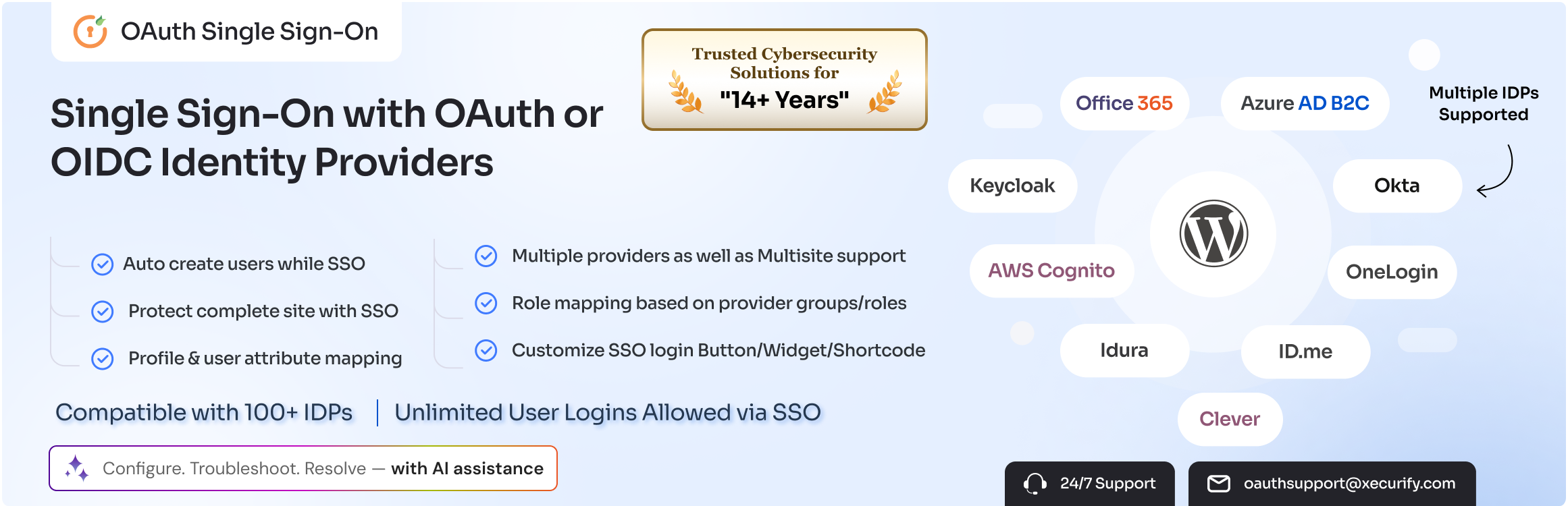
WordPress Single Sign-On (WordPress SSO) with our OAuth & OpenID Connect plugin allows unlimited login/SSO (Single Sign On) with your Azure AD, Azure B2C, G Suite / Google Apps / Google Workspace, ClassLink, Clever, Office 365, AWS Cognito, Discord, PingFederate, Salesforce, Keycloak, Okta, Identity Server, Invision Community or other custom OAuth 2.0 and OpenID Connect providers.WordPress Oauth SSO plugin supports Single Sign On (SSO) with many OAuth 2.0, OAuth 2.1, OAuth 1.0 & OpenID Connect (OIDC) 1.0 providers.
The WordPress OAuth plugin also offers AI-assisted plugin configuration, troubleshooting, and LLM-readable error logs to quickly resolve OAuth SSO login issues.
An unlimited number of users can perform Single Sign-On with OAuth/OIDC supported Identity Providers on WordPress using SSO. SSO OAuth abilities.
| Features | OAuth / OpenID Providers Setup guides | Videos | ChaGPT| Claude| Cursor
=FREE VERSION FEATURES FOR FOR WORDPRESS OAUTH PLUGIN =
- WordPress Single Sign-On OAuth & OpenID Connect Login supports unlimited SSO with any 3rd party OAuth & OpenID Connect server or custom OAuth & OpenID Connect server like AWS Cognito, Azure AD, Azure AD B2C, Office 365, Google Apps, etc.
- WordPress Single Sign-On Grant Support – Standard OAuth2 Grant: Authorization Code
- Auto Create Users ( User Provisioning ) : After Single Sign On, a new user automatically gets created in WordPress
- Account Linking : After SSO, if the user already exists in WordPress, then their profile gets updated. Else, a new WordPress User is created.
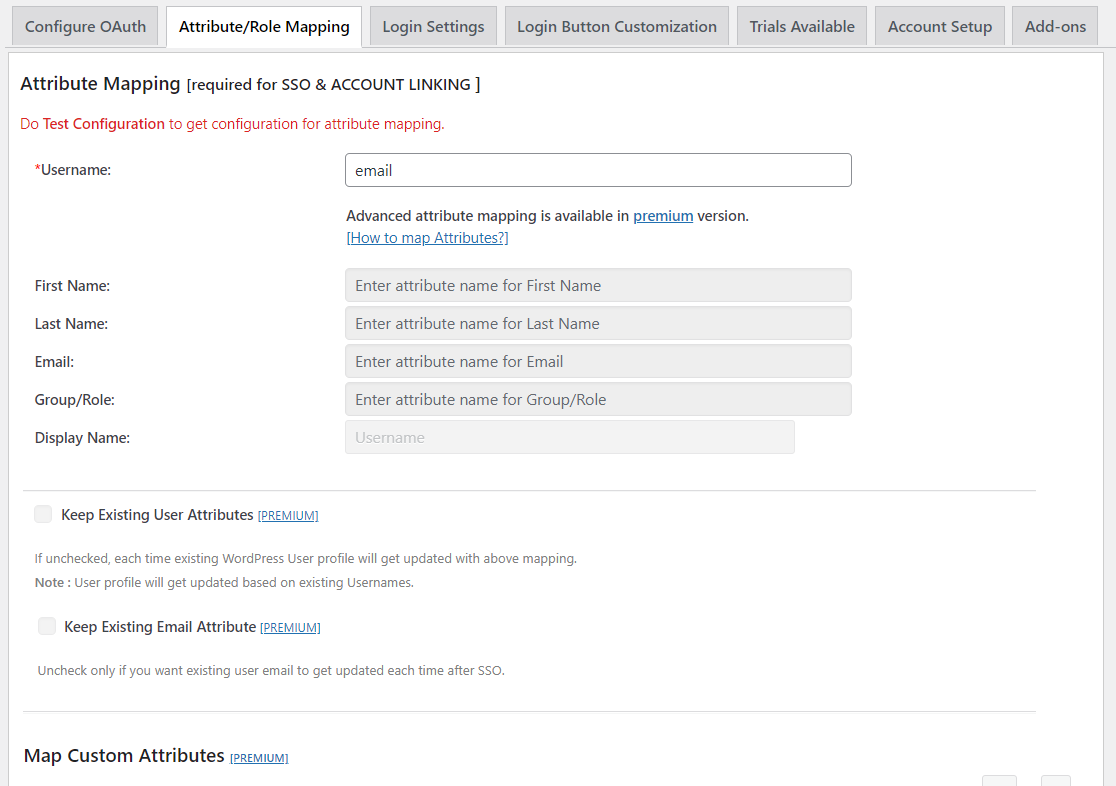
- Attribute Mapping : OAuth Login allows you to map your Identity Provider’s unique attribute with WordPress Username Attribute.
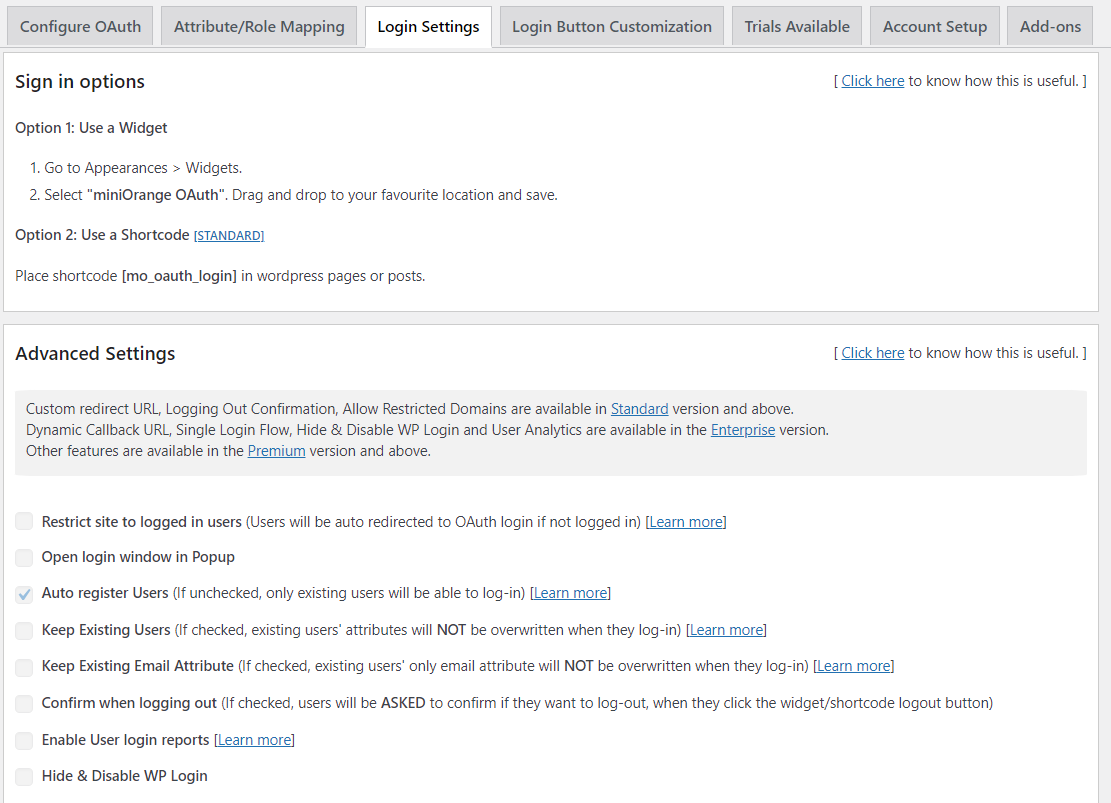
- Login Widget : Use Widgets to integrate the Single Sign-On login on your WordPress site easily.
- OpenID Connect & OAuth Provider Support : WordPress OAuth Plugin (OAuth Login) supports any OpenID Connect & OAuth Provider seamless Single Sign-On.
- Redirect URL after Login : WordPress Single Sign On (OAuth Login) automatically redirects the user after successful Single Sign-On login.
- Logging and Troubleshooting : Enable debug logging to troubleshoot and resolve WordPress OAuth login issues..
PAID FEATURES FOR WORDPRESS OAUTH PLUGIN
- WordPress Single Sign-On Grant Support: Standard OAuth2 Grants including Authorization Code, Implicit Grant, Password Grant, Refresh Token Grant, Client Credential Grant, authorization code grant with PKCE flow, and Hybrid Grant (Customization Available)
- Auto Register Users: Automatic user registration after SSO if the user is not already registered with your site.
- Advanced Attribute Mapping: The WordPress OAuth plugin allows you to map user profile attributes, including username, first name, last name, and email.
- Advanced Role Mapping: Assign roles to users based on defined rules through Single Sign-On.
- Force Authentication / Protect Complete Site: Protect the entire website for public users and grant access only to authenticated users through Single Sign-on.
- Custom Attribute Mapping: Map custom user attributes received from OAuth / OpenID Connect providers to any WordPress user attribute for Single Sign-On.
- Multiple OAuth & OpenID Connect Provider Support: Support for multiple SSO providers.
- Single Login button for Multiple Apps: Provides a single login button for multiple providers.
- Extended OAuth API Support: Extend WordPress OAuth / OpenID Connect API support for enhanced Single Sign-On functionality.
- WordPress Single Sign-On Login Reports: Generate user login and registration reports based on the application used for SSO.
- Enable / Disable WordPress Default Login: Option to disable the default WordPress login form and use SSO instead.
- FrontChannel & BackChannel Single Logout Support: Allows users to be logged out from WordPress as well as the IDP through Single Sign-On.
- Third-Party Plugin Compatibility for Single Sign-On: Compatible with WooCommerce and other third-party plugins for seamless Single Sign-On integration.
- Add-on Support with Plugin: Extend your WordPress OAuth setup with add-ons such as SCIM User Provisioning, Page & Post Restriction, BuddyPress Integration, Login Form, LearnDash Integration, Media Restriction, Attribute/Membership-Based Redirection, SSO Session Management, Paid Memberships Pro Integration, WooCommerce Integration, SSO Login Audit, MemberPress Integration, and Guest User Login.
- No SSL Restriction: Allows SSO login without SSL or HTTPS-enabled site using Google credentials or any other app.
POPULAR WORDPRESS OAUTH AND OPENID CONNECT (OIDC) PROVIDERS FOR SINGLE SIGN-ON
The following providers support WordPress OAuth 2.0 and OpenID Connect SSO for WordPress login.
- AWS Cognito SSO | Login with AWS Cognito
- Office 365 SSO | Login with Office 365
- Azure B2C SSO | Login with Azure B2C
- Azure AD SSO | Login with Azure AD
- ADFS SSO | Login with ADFS
- Auth0 SSO | Login with Auth0
- OKTA SSO | Login with OKTA
- ClassLink SSO | Login with ClassLink
- Keycloak SSO | Login with Keycloak
- Clever SSO | Login with Clever
- Google Classroom SSO | Login with Google Classroom
- Salesforce SSO | Login with Salesforce
- Criipto SSO | Login with Criipto
- G Suite / Google Apps SSO | Login with Google
- Ping Federate SSO ( Ping / Ping Identity ) | Login with Ping Federate
- IdentityServer4 SSO | Login with IdentityServer4
- WordPress IdentityServer3 SSO | Login with IdentityServer3
- Discord SSO | Login with Discord
- OneLogin SSO | Login with OneLogin
- Swiss-RX-Login SSO ( Swiss RX Login ) | Login with Swiss-RX-Login
- Neon CRM SSO | Login with Neon CRM
- iMIS SSO | Login with iMIS
- Signicat SSO | User Verification with Signicat
- ID.me SSO | Login with ID.me
- Canvas SSO | Login with Canvas
- WordPress SSO | Login with WordPress
- WSO2 SSO | Login with WSO2
- OpenAthens SSO | Login with OpenAthens
- HP SSO | Login with HP
- Servicenow SSO | Login with Servicenow
- Invision Community SSO | Login with Invision Community
- OpenAM / Forgerock SSO | Login with Forgerock
- NextCloud SSO | Login with NextCloud
- Orcid SSO | Login with Orcid
- Memberclicks SSO | Login with MemberClicks
- SheepCRM SSO | Login with SheepCRM
- Amazon SSO | Login with Amazon
- Slack SSO | Login with Slack
- Yahoo SSO | Login with Yahoo
- LinkedIn SSO | Login with LinkedIn
- Gitlab SSO | Login with Gitlab
- GitHub SSO | Login with GitHub
- Apple SSO | Login with Apple
- Strava SSO | Login with Strava
- Blizzard / Battle.net SSO | Login with Battle.net
- Eve Online SSO | Login with Eve Online
- Hubspot SSO | Login with Hubspot
- X(Twitter) SSO | Login with Twitter
- Zoho SSO | Login with Zoho
- Idaptive SSO | CyberArk SSO | Login with CyberArk
- WHMCS SSO | Login with WHMCS
- France Connect SSO | Login with France Connect
OTHER WORDPRESS OAUTH AND OPENID CONNECT (OIDC) PROVIDERS WE SUPPORT FOR WORDPRESS SINGLE SIGN-ON (SSO)
- Other OAuth 2.0 and OpenID Connect ( OIDC ) 1.0 servers WordPress Single Sign-On ( SSO ) plugin support includes Office 365, AWS Cognito, Microsoft Dynamic CRM 365, Auth0, Google Workspace, Egnyte, Autodesk, Zendesk, Foursquare, Harvest, Mailchimp, Bitrix24, Spotify, Vkontakte, Huddle, Reddit, Strava, Ustream, Yammer, RunKeeper, Instagram, SoundCloud, Pocket, PayPal, Pinterest, Vimeo, Nest, Heroku, DropBox, Buffer, Box, Hubic, Deezer, DeviantArt, Delicious, Dailymotion, Bitly, Mondo, Netatmo, Amazon, FitBit, Clever, Sqaure Connect, Windows, Microsoft Live, Dash 10, Github, Invision Community, Blizzard, authlete, Keycloak, Procore, Eve Online, Laravel Passport, Nextcloud, Renren, Soundcloud, OpenAM / Forgerock, IdentityServer, ORCID, Diaspora, Timezynk, Idaptive CyberArk, Duo Security, Rippling, Crowd, Janrain, Numina Solutions, Ubuntu Single Sign-On, Apple, Ipsilon, Zoho, Stripe, Itthinx, Fellowshipone, Miro, Naver, Clever, Coil, Parallel Markets, VATSIM, Liferay, Fatsecret, Intuit, iMIS, ORY Hydra, FusionAuth, Kakao, ID.me, MoxiWorks, HR Answerlink / Support center, ClassLink, Google Classroom, MemberClicks, BankID, CSI, Splitwise, Infusionsoft, Hubspot, Join It, MyAcademicID, MemberConnex, Novi, Coassemble, Servicenow, IBM APP ID, Nimble AMS, iSpring LMS, Neon CRM, EPIC, IPB forum, Wiziq, Sprinklr, Elvanto, ABSORB LMS, Wechat, Weibo, Shibboleth, Centrify, FranceConnect, Church Online, Bigcommerce, Sewobe, PracticePanther, SubscribeStar, Eventbrite, Medi-Access, Lichess, CILogon, Servicem8, Gigya, PhantAuth, XING, Simplecast, SURF, MediaWiki, UNA, NetSuite, Oracle IDCS, Globus, Square, SimpleSAMLphp, Basecamp, HP, SHELL, Otoy, Steam, Webflow, Simplepass, Feide, SingPass, Asmodee, SwissID, Miro, Alkami, Switch, Citrix, Schoology, iGov, LearnWorlds, France Connect, DID, Blackboard, UAEPass, Polar, CodeB, Vincere CRM, F5, TicketMaster, BizLibrary, Skolon, Rapattoni, PowerSchool, Minecraft, NETS, Joomla, Drupal, ASP.NET, CA Siteminder, Outseta, XUMM, ID Austria, Ubisecure, Gravitee.io, SheepCRM, Wahoo, WeatherFlow Tempest, OneWelcome / iWelcome, Xbox, Trovo, Cornerstone, Criipto, bare.id, Discourse, Authentik, Sailpoint, Coil, Asset Bank, GrowthZone, Vipps, Authorizer, Deviant Art, Miracl, Teamsnap, Authelia, Django, IDsampa, Cvent, SERMO, Pixelfed, Finys, Login.gov, Fastcase, Acuity, ARPA, Zitadel, Yeti, myID.be, memberful,Open edX / eduNEXT, Teachable, Mindbody etc. This comprehensive SSO support facilitates seamless integration and secure authentication across a wide range of platforms.
WordPress Single Sign-On ( Login to WordPress )
WordPress Single Sign-On allows users to log into any website/application using the single set of credentials of another app/site through the SSO feature.
Example:Let’s say you have all your users/customers/members/employees stored on a site, called ‘site A’ and you want all of them to register/login using SSO to your WordPress site called ‘site B’. In this scenario, you can register/login all your users of site A into site B using the login credentials/account of site A. This is called Single Sign-On, and it simplifies user management.
WordPress Single Sign-On supported Third-Party Application / OAuth OpenID Provider
- The Third-Party Application can be anything where user accounts are stored or a site/application where you want to store/migrate all the users. It can be your social login app, WordPress site, OAuth provider, OpenID provider, custom provider or any database.
-
Identity providers such as OAuth Identity Provider, OAuth Server, OpenID Connect Server, OpenID Connect Provider, and OIDC Application support Single Sign-On. WordPress Oauth integration ensures secure user authentication and management across these platforms.
-
OAuth and OpenID Connect are token-based Single Sign-On protocols that allow an end user’s account information to be used by third-party services without exposing the user’s password.
WordPress Single Sign-On USE CASES
- WordPress to WordPress SSO: Single Sign On to one/multiple WordPress site (single/multisite) using User Credentials stored on another WordPress site with WordPress SSO plugin.
- Use WordPress OAuth to enable Single Sign On to one/multiple WordPress site (single / multisite) using User Credentials stored on your OAuth / OpenID Connect (OIDC) application.
- Single Sign On into WordPress using existing User stores (Active Directory/Database)
- SSO and extended plugin functionality using tokens (access_token / JWT token / id_token) such as secure API calls using third-party token
- Others: eCommerce Single Sign On/Login, Single sign on for Educational and Healthcare platforms
Microsoft SSO/Azure SSO
This WordPress OAuth / OpenID Connect SSO plugin supports SSO with Microsoft apps like Azure AD, Azure B2C, Office 365, Microsoft Dynamics CRM, Microsoft Teams, and Windows Live. It also supports policy-based login redirections, including sign-up, sign-in, forgot password, and custom policies, enhancing the login experience across Microsoft services.
WordPress integrates with Microsoft services like Azure AD, Azure B2C, and Office 365 for secure Single Sign-On across single-site and multisite networks (including subdomains). Users can perform single sign-on, map profile attributes, and manage role-based access across applications and tenants using SSO
Apart from SSO, it also supports WordPress-Azure integrations and customizations, such as token-based calls to specific APIs and the Microsoft Graph API, enhancing the login experience
Cognito SSO
The WordPress OAuth plugin supports WordPress Login with AWS Cognito, Amazon, and WordPress using Cognito. It provides user profile syncing, role mapping, and token fetching from AWS Cognito for API calls. Customizations include integrating Cognito SDKs, syncing new registrations, logging in via the default WordPress form instead of Cognito’s SSO page, connecting to the Cognito User Pool, and configuring login redirections.
Discord SSO
This WordPress Single Sign-On plugin enables Discord login into WordPress. It supports syncing user profiles from Discord to WordPress, mapping Discord roles to WordPress roles, mapping WordPress roles to Discord roles, and managing Discord role memberships based on WordPress purchases.
Keycloak SSO
The WordPress Single Sign-On (OAuth / OpenID Connect SSO) plugin works with Keycloak to enable SSO on your WordPress site. It also lets WordPress use Keycloak access tokens to call external services. In addition, the plugin supports role-based access control (RBAC), so you can map Keycloak roles to WordPress roles and capabilities.
Ping Federate SSO
WordPress OAuth Single sign-on plugin enables Login to WordPress using PingFederate. It supports Single Sign-On with authorized access to Ping REST APIs via access tokens or bearer tokens, ensuring seamless SSO integration and secure interactions with PingFederate.
Clever SSO
OAuth Single sign-on plugin supports WordPress Login with Clever for users (teachers, students, admins) and integrates with LearnDash to sync lessons and assignments. It also provides SSO with other IDPs like ClassLink, Google Classroom, and Canvas, as well as any Identity Provider (SAML, OAuth, OpenID Connect, Active Directory, databases) via miniOrange IDP.
Screenshots

Installation
Download the WordPress OAuth Plugin in 3 Easy Steps
From your WordPress dashboard
- Visit
Plugins > Add New. - Search for
OAuth Single Sign-On. Find and InstallOAuth Single Sign On – SSO (OAuth Client)plugin by miniOrange. - Activate the plugin.
Need more guidance? Please refer to our comprehensive installation guide below.
Pre-requisites
WordPress 3.7 or higher: The OAuth Client SSO plugin supports Single Sign-On with OAuth 2.0, OAuth 2.1, OAuth 1.0, and OpenID Connect (OIDC) 1.0 providers. Check the plugin’s current compatibility requirements before installation.
PHP 7.0 or higher: Recent versions of the plugin require PHP 7.0 or above.
PHP extensions: Ensure that the required PHP extensions, including cURL and OpenSSL, are enabled on your WordPress server. These are used for communication with the OAuth / OpenID Connect provider and secure token exchange.
An OAuth 2.0 or OpenID Connect compliant Identity Provider: The OAuth plugin supports a wide range of providers, including Microsoft Entra ID (Azure AD), Azure B2C, Google Workspace, Okta, AWS Cognito, Keycloak, Salesforce, Discord, PingFederate, ClassLink, Clever, and other OAuth / OpenID Connect providers. Custom OAuth 2.0 and OpenID Connect providers are also supported.
Administrator access to WordPress and the Identity Provider: You need WordPress administrator access to install and configure the plugin, as well as permission to create or configure an OAuth / OpenID Connect application at your Identity Provider.
From your WordPress dashboard Visit Plugins > Add New. Search for OAuth Single Sign-On.
Find and install OAuth Single Sign On – SSO (OAuth Client) by miniOrange.
Activate the plugin from the Plugins page.
From WordPress.org
Download the OAuth Single Sign On – SSO (OAuth Client) plugin from WordPress.org. Unzip the downloaded plugin package.
Upload the miniorange-login-with-eve-online-google-facebook directory to your /wp-content/plugins/ directory.
Activate the plugin from WordPress Dashboard Plugins Installed Plugins.
Activate the OAuth Client SSO Plugin
Go to your WordPress dashboard. Navigate to Settings miniOrange OAuth
Open the Configure OAuth section.
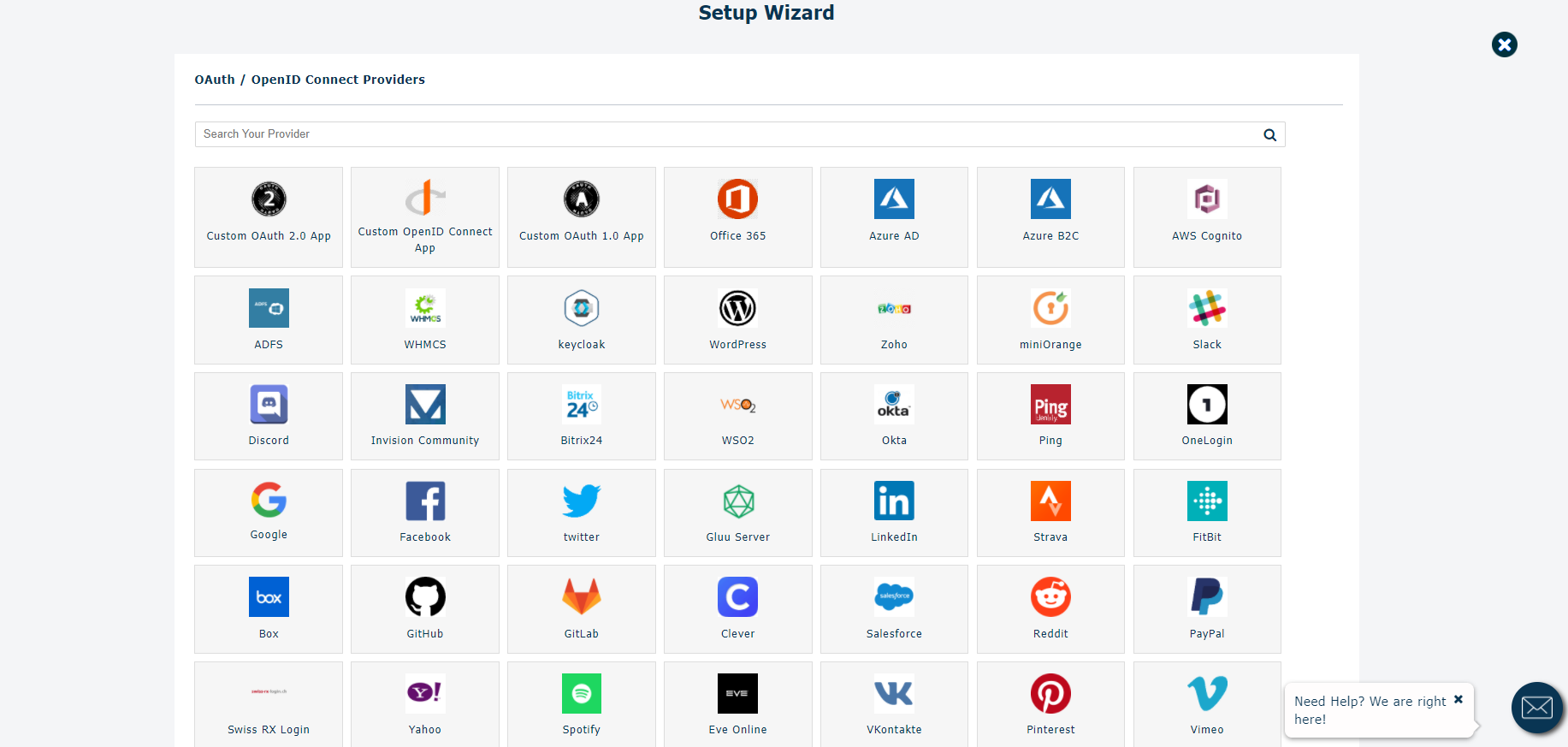
Select your Identity Provider from the available applications or select a custom OAuth 2.0 / OpenID Connect provider.
Follow the provider-specific configuration instructions to establish the SSO connection.
Configure Your OAuth / OpenID Connect Identity Provider
In your WordPress dashboard, go to Settings miniOrange OAuth Configure OAuth. Select your Identity Provider from the supported application list.
If your provider is not listed, select the appropriate Custom OAuth 2.0 Provider or Custom OpenID Connect Provider option.
Open the How to Configure instructions for your selected provider.
Register your WordPress site as an application at your Identity Provider.
Copy the Client ID and Client Secret generated by the Identity Provider.
Enter the required OAuth / OpenID Connect endpoints and credentials into the plugin. Save the configuration.
For OpenID Connect providers, the plugin can use the provider’s standard OIDC configuration to obtain the required authentication and token information.
Configure the OAuth Client
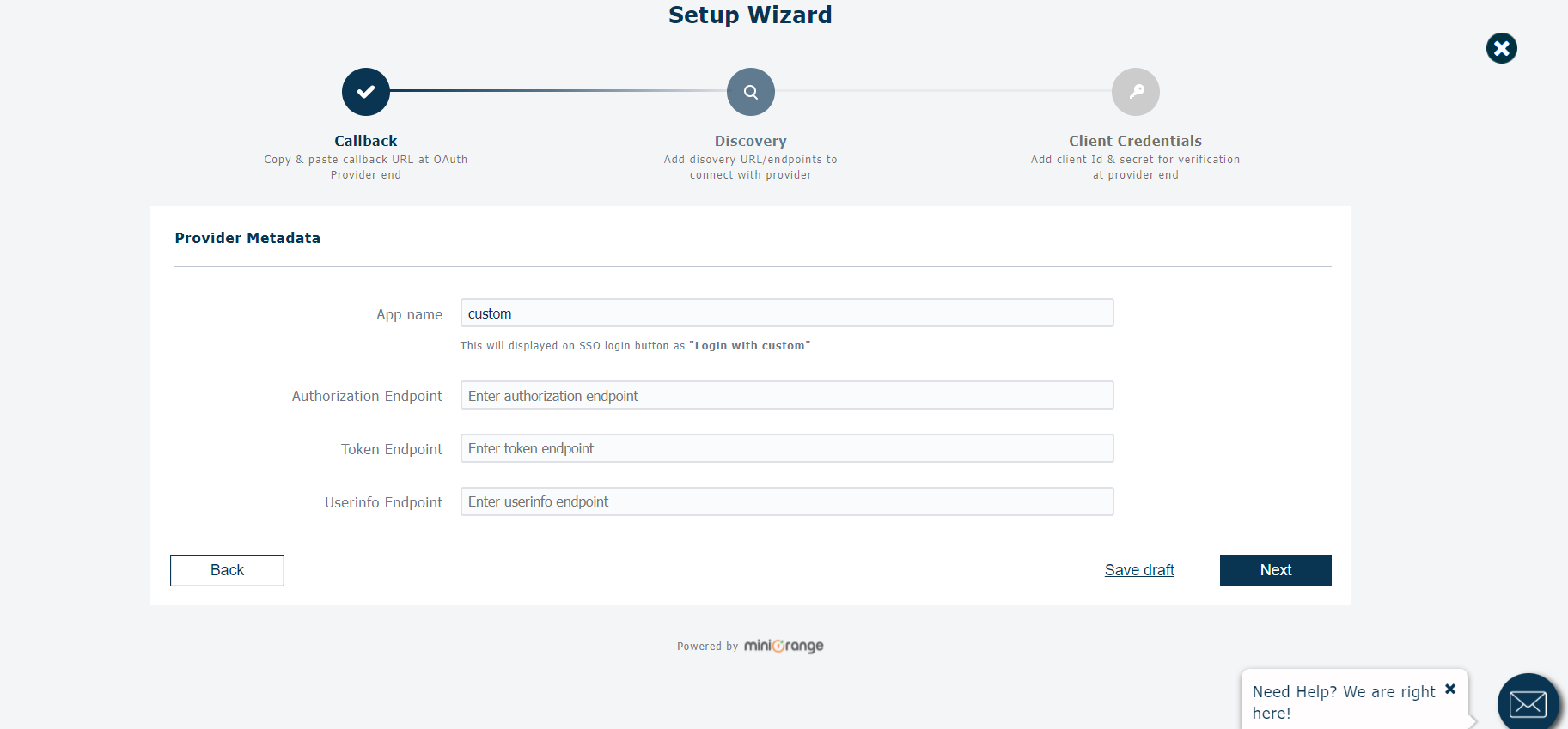
Enter the OAuth / OpenID Connect details supplied by your Identity Provider: Client ID: The unique identifier assigned to your WordPress application by the Identity Provider.
Client Secret: The secret generated by the Identity Provider for your OAuth application.
Authorization Endpoint: The endpoint where users are redirected to authenticate.
Access Token Endpoint: The endpoint used to exchange the authorization code for an access token.
User Info Endpoint: The endpoint used to retrieve the authenticated user’s profile information, when required by the provider.
Scopes: Define the scopes required to retrieve user information, such as openid, profile, and email for OpenID Connect providers.
Save Configuration: Save the OAuth / OpenID Connect settings after entering the required values.
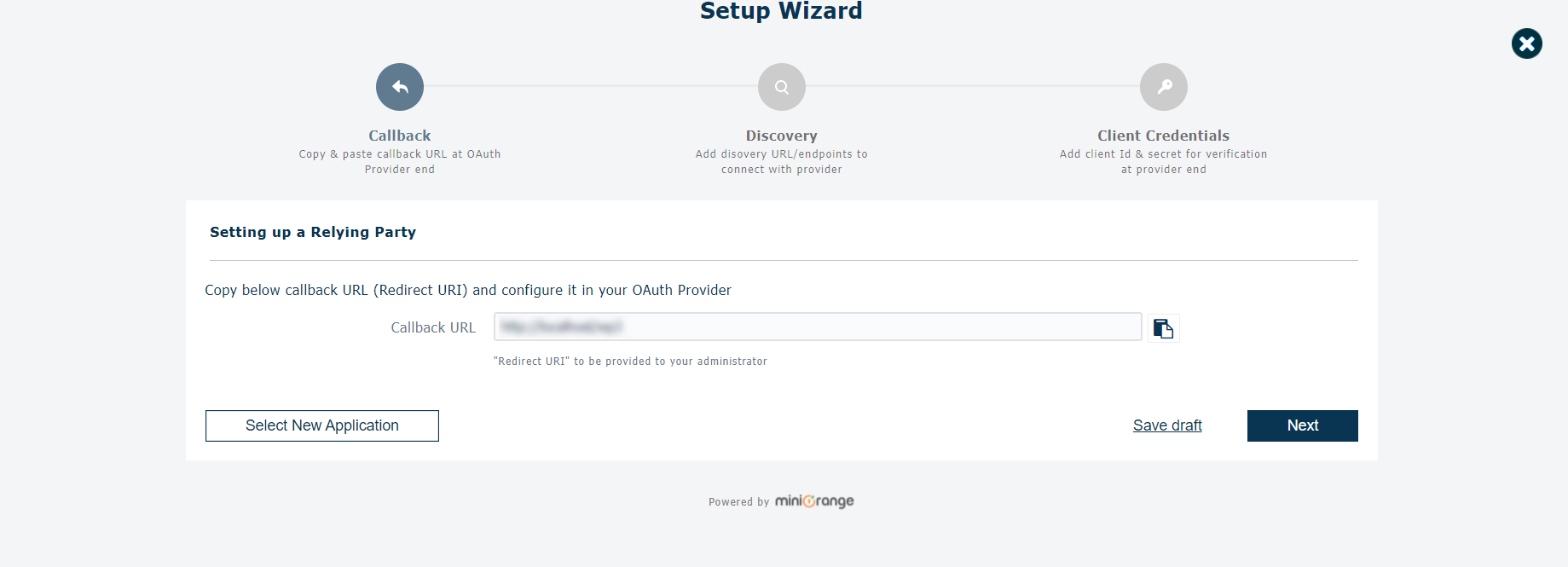
Configure the Redirect / Callback URL
Open the Configure OAuth section of the plugin.
Copy the Callback URL / Redirect URL displayed by the plugin.
Add this URL to the Authorized Redirect URI / Callback URL field in your Identity Provider application.
Save the application settings at your Identity Provider.
Return to WordPress and save the OAuth configuration.
The Redirect URL is important because the Identity Provider sends the user back to this URL after successful authentication.
Test the OAuth SSO Configuration
Go to Settings miniOrange OAuth Configure OAuth.
Verify that the Client ID, Client Secret, endpoints, scopes, and redirect URL are configured correctly.
Click Test Configuration.
Complete the login process at your Identity Provider.
After successful authentication, verify that the user attributes returned by the Identity Provider are displayed by the plugin.
Confirm that the OAuth / OpenID Connect connection is working successfully before enabling SSO for your users.
The plugin supports user provisioning and account linking, allowing a new WordPress user to be created after SSO or an existing WordPress profile to be updated.
Configure Attribute Mapping
Go to the Attribute / Role Mapping section.
Map the attributes received from your Identity Provider to WordPress user fields.
Configure fields such as: Username Email First Name Last Name Save the configuration.
Attribute Mapping allows information received from the OAuth / OIDC provider to be used when creating or updating WordPress user profiles.
Configure Default Role Mapping
- Open the Attribute / Role Mapping section.
*Configure the default WordPress role for users logging in through SSO.
*Select the appropriate role, such as Subscriber.
*Save the configuration.
*For advanced configurations, role mapping rules can be used to assign WordPress roles based on attributes received from the Identity Provider.
Add the OAuth SSO Login Button
The plugin provides multiple ways to allow users to start the SSO login process.
Open the Login Widget / SSO Links section.
Configure the appearance and placement of the SSO login button.
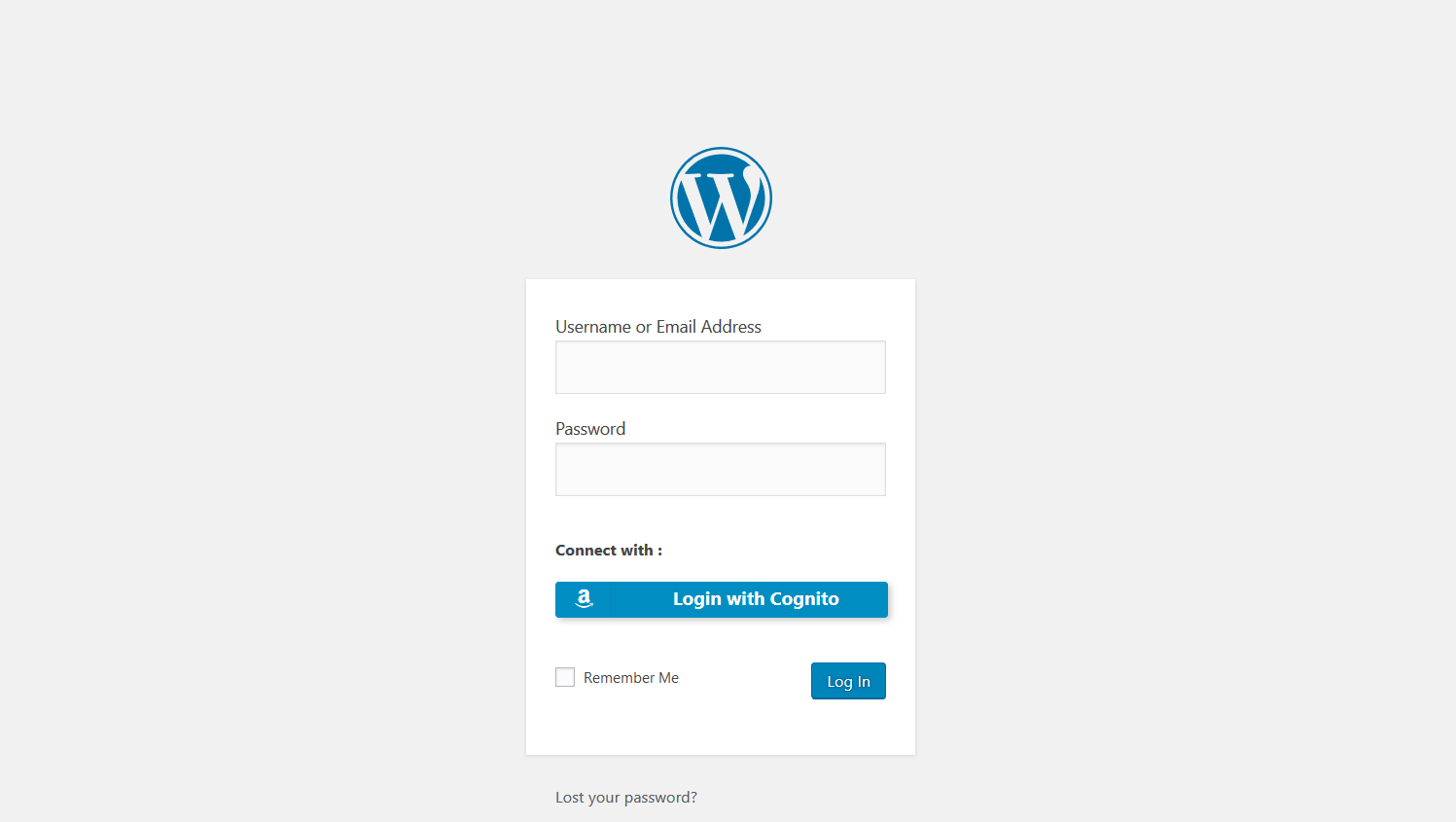
Enable the SSO button on the WordPress login page if required.
Save the configuration.
Visit the WordPress login page and verify that the SSO login option is displayed.
Add the OAuth Login Widget
Go to Appearance Widgets.
Locate the miniOrange OAuth widget.
Drag the widget into the desired widget area.
Save the widget configuration.
Visit your website and verify that the OAuth SSO login option is displayed.
The WordPress.org installation instructions specifically provide the miniOrange OAuth widget for adding the SSO login option to a widget area.
Configure Login Redirection
Configure where users should be redirected after a successful SSO login.
Open the plugin’s redirection settings.
Enter the desired Redirect URL after Login.
Save the configuration.
Test the SSO flow and verify that users are redirected to the expected page.
The plugin also supports separate redirect URLs for login and logout in supported plans.
Account Linking and User Provisioning
The OAuth Client plugin can automatically handle WordPress user accounts during SSO.
When a new user performs SSO, the plugin can create a corresponding WordPress account.
If the user already has a WordPress account, the plugin can link the SSO identity to the existing account.
User attributes can be updated based on the information received from the Identity Provider.
Configure attribute mapping to control which Identity Provider attributes are synchronized with WordPress.
AI-Assisted Troubleshooting
- The OAuth Client plugin includes AI-assisted troubleshooting capabilities.
- Navigate to the plugin’s Troubleshooting section.
- Enable the AI-assisted configuration or troubleshooting option, where available.
- The plugin can generate structured OAuth error information that can be interpreted by AI tools.
- Use the generated error information to identify configuration issues and troubleshoot failed SSO attempts.
- The plugin documentation states that AI-assisted troubleshooting can structure OAuth errors for interpretation by tools such as ChatGPT, Claude, or Perplexity.
Abilities API / MCP Setting
- The current plugin also includes an AI / MCP Abilities API integration.
- Go to the miniOrange OAuth plugin settings in your WordPress dashboard.
- Open the AI / MCP or Abilities API settings, where available.
- Enable the required Abilities API / MCP option.
- Configure the required permissions according to your use case.
- Connect your supported AI agent to WordPress using the provided integration instructions.
- The current plugin changelog notes the addition of an AI / MCP Abilities API integration for configuring SSO, diagnosing errors, and submitting support queries through AI agents.
Common Errors While Installation
Why does the SSO login fail after authentication? Cause: The Callback / Redirect URL configured in the Identity Provider does not exactly match the URL generated by the OAuth plugin. Solution: Copy the Callback URL displayed in the plugin and add it exactly as an Authorized Redirect URI in your Identity Provider application. Check for differences in http vs. https, domain name, path, and trailing characters.
Why am I getting an invalid Client ID or Client Secret error? Cause: The Client ID or Client Secret entered in the plugin does not match the credentials generated by the Identity Provider. Solution: Copy the Client ID and Client Secret again from the Identity Provider application and update the plugin configuration.
Why does the SSO login return an invalid scope or permission error? Cause: The scopes configured in WordPress are not supported or have not been granted by the Identity Provider. Solution: Verify the required scopes with your Identity Provider and ensure that the configured scopes match the provider’s requirements.
Why are user details not being populated correctly? Cause: The attributes returned by the Identity Provider do not match the attribute mappings configured in the plugin. Solution:Use Test Configuration to view the attributes returned by the provider and map the appropriate attributes to the WordPress username, email, first name, and last name fields.
Why does the OAuth provider authenticate the user but WordPress does not create the account? Cause: User provisioning or attribute mapping may not be configured correctly. Solution: Verify the account creation / user provisioning settings and ensure that a valid username and email attribute are being received from the Identity Provider.
Why am I getting a state verification or invalid state error? Cause: The OAuth authentication state returned by the provider does not match the state generated by the WordPress plugin. This can occur because of caching, session handling, proxy configuration, or an interrupted authentication flow. Solution: Clear relevant WordPress/browser caches, verify that the site’s URL and callback URL are consistent, and retry the SSO flow. If the issue persists, review the plugin’s troubleshooting/debug logs.
Why is the plugin showing an error for an invalid UserInfo endpoint? Cause: The configured UserInfo endpoint is invalid or does not return the expected user information. Solution: Verify the UserInfo endpoint with your OAuth / OpenID Connect provider and ensure that it is reachable and returns the expected user attributes.
Get Help
Open the miniOrange OAuth configuration page in your WordPress dashboard.
Review the provider-specific configuration guide.
Use the plugin’s troubleshooting and debug logging options when investigating SSO errors.
Submit a support request from the plugin configuration page if additional assistance is required.
The WordPress.org listing confirms that support requests can be submitted through the plugin’s configuration page.
FAQ
-
I need to customize the WordPress OAuth plugin / I need support and help
-
Please email us for more information on SSO solution at info@xecurify.com or Contact us. You can also submit your query from plugin’s configuration page.
-
How do I configure the applications?
-
On Configure OAuth page, check if your app is already there in default app list, if not then select the custom OAuth 2.0 app or Custom OpenID Connect Provider app based on the protocol supported by your provider. Then click on How to Configure link to see configuration instructions steps for Single Sign-On.
-
This WordPress OAuth SSO / Login plugin is not compatible with plugins installed on my site. What can I do?
-
Please email us at info@xecurify.com or Contact us. You can also submit your query from plugin’s configuration page.
-
This WordPress OAuth SSO / Login plugin is not working on Network level of Multisite WordPress environment. What can I do?
-
You can activate the plugin on any subsite of the Multisite network instead of activating the plugin at the network level. If you want to activate the plugin at the network level such that a single set of configurations will apply to all the subsites in a network then we have a separate plugin plan for multisite. Please email us at info@xecurify.com or Contact us for more information on this SSO solution and other integrations. You can also submit your query from plugin’s configuration page.
-
I need integration of this WordPress OAuth plugin with my other installed plugins like BuddyPress, Woocommerce, MemberPress, Learndash, and other third-party plugins
-
We will help you in integrating this plugin with your other installed plugins. This plugin is already compatible with WooCommerce, MemberPress, BuddyPress & Learndash. Please email us at info@xecurify.com or Contact us for other integrations. You can also submit your query from plugin’s configuration page.
-
Can I add multiple SSO options on my WordPress sites?
-
Yes, you can add multiple IDPs for Single Sign-on on your WordPress sites. e.g. Azure AD, G Suite / Google Apps, Office 365, Salesforce, Keycloak, and many more.
-
I would like to change our license domain. How do we do this?
-
Yes, You can now activate the license on your new domain to enable WordPress Single Sign-on. Write us at info@xecurify.com we will help you set up.
-
Is it possible to set a different redirect URL after login & logout
-
Yes, with a standard license, you can set a different redirect URL to redirect to after Single Sign-On login as well as after logout.
-
How does AI-assisted troubleshooting Work?
-
AI when enabled, the plugin logs OAuth errors in a structured format that can be interpreted by AI tools like ChatGPT, Claude, or Perplexity. You can paste error messages into these tools to quickly identify and resolve configuration issues.
-
For any other query/problem/request
-
Please email us for more information on this SSO solution at info@xecurify.com or Contact us. You can also submit your query from plugin’s configuration page.
Reviews


Contributors & Developers
“OAuth Single Sign On – SSO (OAuth Client)” is open source software. The following people have contributed to this plugin.
Contributors
“OAuth Single Sign On – SSO (OAuth Client)” has been translated into 3 locales. Thank you to the translators for their contributions.
Translate “OAuth Single Sign On – SSO (OAuth Client)” into your language.
Interested in development?
Browse the code, check out the SVN repository, or subscribe to the development log by RSS.
Changelog
7.1.1
- Compatibility with WP 7.1
- Added Proper Error handling for the End-Users
7.1.0
- Added validation for app access
7.0.1
- Security fix
7.0.0
- UI changes and security fixes in the WordPress OAuth plugin
6.26.20
- Added compatibility with WordPress 7.0
- Added AI / MCP Abilities API integration (8 abilities for configuring SSO, diagnosing errors, and submitting support queries via AI agents)
- Added AI Setup tab in Troubleshooting page with instant-save toggle
- Security fix in the WordPress OAuth plugin
6.26.19
- Added filter to load SSO button on WooCommerce login page
- Added filter to load SSO button on Blocksy theme login page
- Security fixes in the WordPress OAuth plugin
6.26.18
- Fixed client IP detection in multi-proxy setups
- Fixed error when configuring an invalid UserInfo endpoint
- Fixed Debug log unexpected character issue.
6.26.17
- Removed Cyber Monday sale advertise
6.26.16
- Added WordPress 6.9 Compatibility
- Added Cyber Monday sale advertise
6.26.15
- Added timestamp to SSO link to prevent caching in the WordPress OAuth plugin
- Fixed incorrect redirection after SSO caused by an invalid URL stored in the database
- Corrected SSLverify argument in remote requests to prevent against MITM
- Updated class name prefixes for improved consistency and compatibility
- Added BFCM sale advertise
6.26.14
- Fixed cookie naming error
6.26.13
- Added automatic clear of plugin log file after 7 days
- Improvement in the OpenID flow to handle ID token
- Improvement in the state verification flow in the WordPress OAuth plugin
6.26.12
- Updated debug log file path
- Minimum PHP version updated to 7.0 and above
6.26.11
- Added support for trial access in paid applications
- Fix REST API notice issue for PHP <7.1
6.26.10
- Readme changes in the WordPress OAuth plugin
6.26.9
- Advertise premium applications like iMIS, NeonCRM, and others
- Minor UI improvements and bug fixes in the WordPress OAuth plugin
6.26.8
- Added WordPress 6.8 Compatibility in the WordPress OAuth plugin
- Removed in-plugin License page
- License menu now redirects to product page
6.26.7
- Improved email validation for contact form
- New Slack icon to the UI/assets
6.26.6
- Added option to check if the REST endpoint is open
6.26.5
- Removed BMCF sale banner in the WordPress OAuth plugin
6.26.4
- Security fixes.
6.26.3
- Added BMCF sale banner
- Attribute mapping improvements in the WordPress OAuth plugin
6.26.2
- Add WordPress 6.7 Compatibility in the WordPress OAuth plugin
- Added Email mapping with user profile
- Added restrict admin user to perform SSO feature
- Security fixes in the WordPress OAuth plugin
6.26.1
- Update the setup guide links for Diaspora, AWS Cognito, and others
6.26.0
- Added WordPress 6.6 Compatibility
- Improvised safe deletion of plugin logs
- Readme changes in the WordPress OAuth plugin
6.25.4
- Improvements in the SSO with Twitter OAuth 1.0 flow
- Added X(twitter) icon
- Improvements in the license tab
6.25.3
- Added WP 6.5 Compatibility
- Advertised Report Analytics feature
6.25.2
- Updated Account setup tab.
- Readme changes in the WordPress OAuth plugin
6.25.1
- License portal update in the WordPress OAuth plugin
- Advertised custom icon feature
6.25.0
- Added WP 6.4 Compatibility
- Added WordPress SSO with Steam
- Licensing policy updated
6.24.10
- Improvised WordPress SSO logs
- Readme Changes in the WordPress OAuth plugin
6.24.9
- Added WP 6.3 Compatibility
- Added full featured Demo environment
6.24.8
- Updated troubleshooting feature
- UI changes for simpler configuration
- Updated Onelogin APIs
6.24.7
- UI changes for easy configuration in the WordPress OAuth plugin
- Added troubleshooting feature
- Fixed paid to free plugin migration
- Delete application issue fix for single quote
- Plugin conflict fix with Easy digital downloads plugin
- Fixes in SSO Test configuration flow
6.24.6
- Readme changes in the WordPress OAuth plugin
- Minor fixes in the WordPress OAuth plugin
6.24.5
- UI fixes in the WordPress OAuth plugin
6.24.4
- Added WP 6.2 Compatibility
- Discovery flow fixes for OpenID connect applications
- UI improvements in the WordPress OAuth plugin
6.24.3
- Cloud Demo details added
- UI bug fixes in the WordPress OAuth plugin
- Deactivation Feedback form improvements
6.24.2
- CSRF Vulnerability fix
6.24.1
- Some readme changes in the WordPress OAuth plugin
6.24.0
- Many UI changes in the WordPress OAuth plugin
- Security fixes
- Provider specific usecase listings
- Zendesk, Zoho, LinkedIn app changes
6.23.7
- Added some JS bug fixes
- Some UI improvements in the WordPress OAuth plugin
6.23.6
- Added WP 6.1 Compatibility
- Minor bug fixes in the WordPress OAuth plugin
6.23.5
- Minor fixes in Video demo section
6.23.4
- Plugin Deactivation fixes
- Minor bug fixes in the WordPress OAuth plugin
6.23.3
- Added Clever and Bitrix SSO fix
- Added Video demo option
- Minor bug fixes in the WordPress OAuth plugin
6.23.2
- Resolved Conflict issues between WP OAuth Server & Client plugin
- Many UI fixes in the WordPress OAuth plugin
- Minor bug fixes in the WordPress OAuth plugin
6.23.1
- Pricing Page UI fixes in the WordPress OAuth plugin
6.23.0
- Security fixes in the WordPress OAuth plugin
6.22.5
- Added new UI elements
- Added troubleshooting enhancements
- Improved UI of SSO button on the wp-login page
- Minor vulnerability fixes in the WordPress OAuth plugin
- Many Bug fixes and UI improvements in the WordPress OAuth plugin
6.22.4
- Added WP 6.0 Compatibility
- Minor UI fixes
6.22.3
- Added fix for Keycloak 17+ versions
- Added fix for Reddit application
- Added support for new providers
6.22.2
- Troubleshooting flow driven improvements
- Ecwid plugin conflict fix
- Invision Community fix
- Added feature to delete all plugin configurations on deactivation
- Added new applications (Joomla, Drupal, Dynamics 365, .NET)
6.22.1
- Fixed minor UI issue in the WordPress OAuth plugin
6.22.0
- Added header body check in flow driven
- Support for OAuth 2.1 protocol
- Added support for Ticketmaster application
6.21.9
- Added some troubleshooting UI changes in the WordPress OAuth plugin
6.21.8
- Added WP 5.9 Compatibility
- Added troubleshooting for incorrect Discovery Endpoint
- Added Fix for laravel passport provider
- Added support for Microsoft Live application
6.21.7
- Added some guide links for different providers
6.21.6
- SEO compatibility changes in the WordPress OAuth plugin
6.21.5
- Added Support for WordPress SSO with Canvas
6.21.4
- Flow driven UI fixes in the WordPress OAuth plugin
- End of Year Sale in the WordPress OAuth plugin
6.21.3
- Added fix for Support request form
- UI changes regarding Black friday sale
6.21.2
- Minor UI change in the WordPress OAuth plugin
6.21.1
- Minor UI change in the WordPress OAuth plugin
6.21.0
- Added flow driven UI
- PHPCS fixes
- CSS loading fix
6.20.4
- Minor changes in readme in the WordPress OAuth plugin
6.20.3
- Security related fix in the WordPress OAuth plugin
6.20.2
- LearnPress conflict fix
- WordFence 2FA conflict fix
- Added Automatic Attr Mapping
- Setup guide & Video guide button on UI
- Licensing plan UI change
- Readme changes in the WordPress OAuth plugin
6.20.1
- Added WP 5.8 Compatibility
- Added support for OAuth 1.0
- UI Changes & fixes in the WordPress OAuth plugin
- Readme changes in the WordPress OAuth plugin
6.20.0
- UI Changes & fixes in the WordPress OAuth plugin
- Readme changes in the WordPress OAuth plugin
6.19.8
- Minor changes in the WordPress OAuth plugin
6.19.7
- Debug log feature minor fixes in the WordPress OAuth plugin
- Discovery flow scope related fixes
- Added default applications for IBM APP ID, Servicenow, Idaptive
6.19.6
- Added improvements in Debug Log feature
- Added different Language compatibility
6.19.5
- Added WP 5.7 Compatibility
6.19.4
- Discovery URL fixes
- Add-ons UI change
- Error log fixes
- Twitter SSO fixes
- Readme changes
6.19.3
- Minor Code Fixes
= 6.19.2
* Compatibility with WooCommerce plugin
* UI updates.
6.19.1
- Minor bug fixes
6.19.0
- Added Debug log feature
- Added check for state parameter
- Updated add-ons tab UI and Feedback form UI
- Added WP 5.6 Compatibility
6.18.1
- Minor UI changes
6.18.0
- Added Twitter support Application
- Added Freja eID Application for WordPress SSO
- UI updates
6.17.3
- Clever & Ping configuration fixes
- UI updates
6.17.2
- Minor fixes
6.17.1
- Keycloak configuration fixes
- UI Updates
6.17.0
- Configuration fixes
- UI Updates
6.16.3
- Compatibility with WordPress 5.5
6.16.2
- Minor fixes
- Added support for new Apps ( Clever, Auth0 )
6.16.1
- Minor fixes
6.16.0
- Automated the plugin OAuth & OIDC configuration
- Added Setup a Call button
- Added UI changes and minor bugfixes
6.15.3
- Minor fixes
6.15.2
- Added default apps for WordPress, Zoho, miniOrange Providers
- Updated WHMCS Endpoint
6.15.1
- Added Copy Callback feature
- Added option to map attributes(manual/automatic)
- Added fixes for Demo Request feature
- Fixed empty UserInfo Endpoint issue
- Added new Apps for Login with Azure – Azure AD, Azure B2C and end to end sso setup guides
- Updated Licensing Plan
- Advertised new features
- Other minor bugfixes and UI changes
6.15.0
- Updated Licensing plan
6.14.5
- Attribute mapping fix
- Some UI fixes and bug fixes
- Added new providers
- Added check for failed registration for blocked domains and displayed the message accordingly
6.14.4
- Dropdown fix
- Added new providers
- Minor compatibility fixes
6.14.3
- UI Updates
6.14.2
- Minor Fixes
6.14.1
- Added nonces and sanitized required parameters
- Updated all the 3rd party libraries
- Added constants
- Added fixes for account setup and attribute Mapping
- Added New Providers ( ORCID, Diaspora, Timezynk )
6.14.0
- Updated widget logos
- Automated Attribute Mapping
- Updated Visual Tour
- Added New Providers ( miniOrange, Identity Server, Nextcloud, Twitch, Wild Apricot, Connect2id )
- Updated Support Query / Contact Us form
6.13.0
- Fixed the SSO for Default Azure app
- Advertised SSO Setup Video
- Updated plugin licensing
- Added support for new providers ( Centrify, NetIQ, OpenAM, IdentityServer )
- Minor compatibility fixes
6.12.12
- Added fixes for Widget / Login Button Logo
- Added fixes for common CSS conflicts
- Updated UI
- Added WordPress Theme Compatibility
6.12.11
- Removed unused libraries
6.12.0
- Added Login Button on WordPress Dashboard
- Updated Login Button UI
- Added checkboxes to send Client Credentials in Header/Body
- Fixed Attribute Mapping, backslash issue
- Fixed CSS conflicts
- Automated Request for Demo
6.11.4
- Added support for WSO2 & Swiss-Rx-Login ( Swiss RX Login )
- UI updates
6.11.3
- Added Add-on tab
- Added UI Changes
- Added compatibility for WordPress version 5.2.2
6.11.2
- Attribute Mapping fixes
- minor UI Changes
6.11.1
- Minor bugfixes
6.11.0
- Bug fixes and Minor UI changes
6.10.6
- Added Compatibility for WordPress version 5.2.1
- Updated API of support query
- Updated Registration form
- Added Request for Demo form
- Added Forum link
- Advertised New Features –
- Updated Licensing Plan
6.10.5
- Added compatibility for WordPress version 5.2
6.10.4
- Added Authorization Headers
6.10.3
- Added support for Meetup, Autodesk and Zendesk
- Updated Feedback form
6.10.2
- Added email validation on login
- Tested WP 5.1 compatibility
6.10.1
- Added WHMCS in default applist
6.10.0
- Updated Google APIs
- Fixed cURL issues
6.9.17
- Updated Licensing Plan
6.9.16
- Added Uninstall fixes
6.9.15
- Updated Licensing plan
6.9.14
- Added CSS fixes
6.9.1
- UI changes
6.9.0
- Delayed Registration
- Updated Password Validation
6.8.1
- Added Bug Fixes
6.8.0
- Added Visual Tour
- Updated UI
- Added Setup Guides Links
6.7.0
- Compatibility with WordPress 5.1
6.6.5
- Added FAQ Tab
6.6.2
- Added Bug Fixes
6.6.1
- Added Bug Fixes
6.6.0
- Updated UI
- Added Auto Create User feature
6.5.0
- Added support for OpenID Connect ( OIDC ) Provider
- Added option to disable Authorization Header for Get User Info Endpoint
6.4.0
- Updated Licensing Plan
6.3.0
- Bug fixes for ‘Vulnerable Link’ issue
6.1.2
- Bug fix for Invalid OTP error
6.1.1
- CSS customizations
6.0.2
- Added premium features page.
6.0.1
- Updated list of OAuth Providers.
5.22
- Handled self signed SSL sites and slashes.
5.21
- Bug fixes fetching user resource
5.20
- Added shortcode option
5.12
- Added Windows Live app and bug fixes
5.10
- Changed callback url
5.9
- Added UI customizations.
5.8
- Bug fix for warnings showing up.
5.3
- Compatibility with WordPress 4.7.3
2.4
- Registration Fixes
2.3
- Eve Online Changes
- Compatibility with WordPress 4.5.1
2.2
- Bug fixes
- Compatibility with WordPress 4.5
2.1
- Bug fixes
2.0
- Email after first login.
- Redirection after login – same page or custom.
- Shortcode
- Added option for allowed faction.
- Denied access for character, alliance, corp, faction.
1.8
- Sets last_name as EVE Online Character Name when user logs in for the first time
1.7
- Bug fixes for some users facing problem after sign in
1.6
- Bug fixes.
1.5
- Fixed bug where user was not redirecting to EVE Online in some php versions.
1.4
- Bug fixes
1.3
- Bug fixes
1.2
- Bug fixes
1.1
- Added email ID verification during registration.
1.0.5
- Added Login with Facebook
1.0.4
- Updates user’s profile picture with his EVE Online character image.
- Submit your query (Contact Us) from within the plugin.
1.0.3
- Bug fix
1.0.2
- Resolved EVE Online login flow bug in some cases
1.0.1
- Resolved some bug fixes.
1.0
- First version with supported applications as EVE Online and Google.