

Description
Blogtome automatically turns the published posts of a WordPress category into a print-ready PDF book – sorted chronologically, chapter by chapter. Ideal for travel blogs, journals, or project documentation you want to turn into a printed book or ebook.
Good to know
Blogtome always processes all published posts of the selected category – picking individual posts within a category is not currently possible. Because blog content can be built very differently depending on the blocks and plugins used, a perfect print result can’t be guaranteed 100% for every possible combination – for unusual or highly individual content, it’s worth checking the generated PDF before sending it to print.
Chapters & layout
- Uses all published posts of a category as individual chapters, sorted chronologically
- Two output profiles: Screen/Standard (A4, 210 × 297 mm) or Print/HighRes (216 × 303 mm including 3 mm bleed, 300 dpi) for professional print services
- One- or two-column layout, automatically switches to one column for chapters containing tables
- Optional header with book title/subtitle, continuous or per-chapter page numbering
- Freely choosable background and text colors for the title page and content
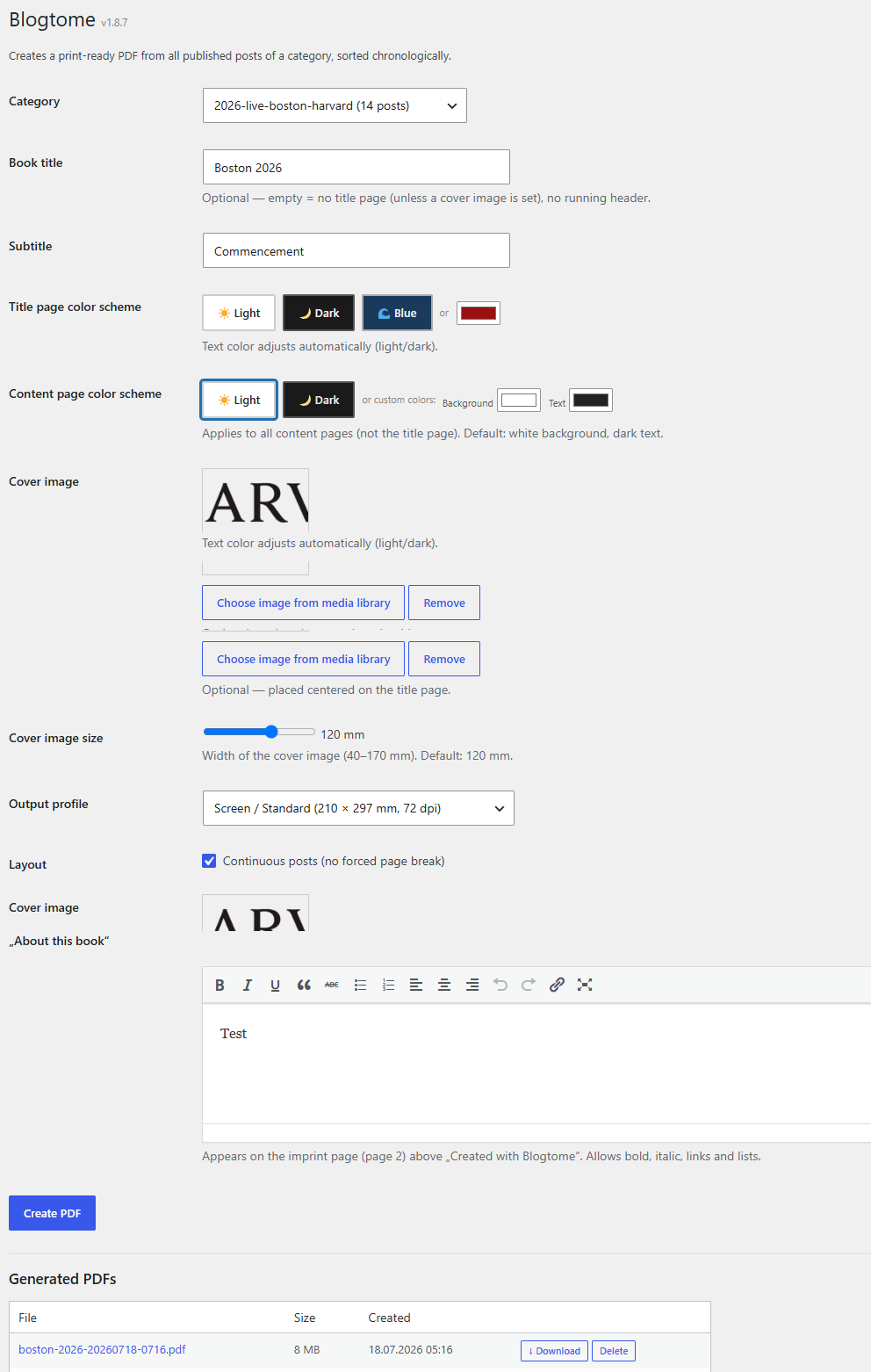
- Optional cover image with adjustable size, plus a freely editable “About this book” text block
Supported block editor content
- TablePress: embedded TablePress tables – including those inserted via shortcode – are recognized and automatically formatted for print
- Spectra (formerly Ultimate Addons for Gutenberg / UAGB): image galleries, single images with captions, and container blocks are natively supported
- Classic Gutenberg images with captions stay together with their caption across page breaks
- Embedded videos are automatically replaced in the PDF with a QR code linking to the original video
Management
- Generated PDFs are saved and can be downloaded or deleted directly from the admin area
- The most recently used settings are remembered automatically
Why this plugin?
Blogtome started out of simple curiosity: how do you turn the posts of a travel blog into an actual, printed book without a huge amount of effort? That question gradually turned into a plugin that now reliably produces print-ready PDFs – even from categories with lots of images, tables, and galleries.
If Blogtome is useful to you and has saved you time, I’d appreciate a coffee: Buy Me a Coffee.
Screenshots
Installation
- In the WordPress admin area, go to “Plugins > Add New”, search for “Blogtome” and install it
- Activate the plugin
- Go to “Tools > Blogtome”, select a category and configure the book
Requirements
- PHP 8.0 or higher
- For TablePress support: the TablePress plugin must be installed and active
- For Spectra block support: the Spectra plugin (formerly Ultimate Addons for Gutenberg) must be installed and active
FAQ
-
Do I need TablePress or Spectra for Blogtome to work?
-
No. Blogtome works with regular Gutenberg posts without any additional plugins. TablePress and Spectra are supported in addition, if you use them – their content is then automatically formatted correctly for print.
-
Can I order the PDF directly from a print service?
-
The “Print / HighRes” profile produces a PDF with 3 mm bleed and 300 dpi at a final size of 216 × 303 mm, which is what many print-on-demand services expect. Please still check the exact requirements of your chosen print service before ordering.
-
Where do I find the generated PDFs?
-
All generated books are listed in the admin area under “Tools > Blogtome”, where they can be downloaded or deleted.
Reviews
There are no reviews for this plugin.
Contributors & Developers
“Blogtome” is open source software. The following people have contributed to this plugin.
Contributors
Translate “Blogtome” into your language.
Interested in development?
Browse the code, check out the SVN repository, or subscribe to the development log by RSS.
Changelog
1.9.4
- Fixed excessive PDF size/page count introduced by the 1.9.2/1.9.3 gallery fix: images in detected native galleries now respect the selected profile (Screen/Standard uses the moderate size WordPress already serves, Print/HighRes uses the original resolution) instead of always embedding the largest available image
1.9.3
- Fixed the 1.9.2 gallery detection: page builders like Elementor don’t store an enclosing gallery wrapper in the post content (only in their live front-end rendering), so galleries were still not recognized in some cases. Detection no longer depends on that wrapper.
1.9.2
- Image galleries built with page builders that reuse WordPress’s native gallery markup (e.g. Elementor’s Image Gallery widget) are now recognized and rendered with proper spacing in the PDF, instead of images sticking together with no gap
1.9.1
- Added the German (de_DE) translation, prepared for 1.9.0 but accidentally left out of that build
1.9.0
- Internationalization: all visible strings in the admin interface (and in the generated PDF, e.g. the imprint line and video placeholders) are now translation-ready, using the
blogtometext domain - Translations can now be contributed via the official WordPress.org translation platform (https://translate.wordpress.org/projects/wp-plugins/blogtome/)
1.8.8
- Bundled third-party libraries (mPDF and its dependencies: psr/log, psr/http-message, myclabs/deep-copy, setasign/fpdi, mpdf/qrcode) are now loaded under a plugin-owned namespace prefix (Blgt\Vendor...) instead of their original namespaces, to eliminate any possibility of class/namespace collisions with the same libraries bundled by other plugins
- Removed unused bundled font files (Arabic-script XB Riyaz family, ~4.4MB) that were never reachable from this plugin’s font configuration
- Removed dev-only files from bundled libraries (composer.json, phpunit.xml, README, CHANGELOG, static-analysis configs) that are not used at runtime
- Removed unused Doctrine-specific code paths from the bundled deep-copy library (not used by mPDF’s actual usage of that library)
1.8.7
- Added a “Donate” action link (Plugins list page) linking to Buy Me a Coffee
1.8.6
- Added a “Documentation” link to the plugin’s meta row (Plugins list page), pointing to a dedicated documentation page
1.8.5
- Renamed the plugin from “PrintReady Book Builder” to “Blogtome” — WordPress.org flagged the previous name as too generic and confusable with existing print-industry products; “Blogtome” is a distinctive coined term
- Function/option/nonce prefix changed from
prbb_toblgt_ - Added an “Author URI” link and a direct “Blog to me” action link on the Plugins list page for easier access
- Translated the admin interface from German to English
1.8.4
- Removed special characters (parentheses) from 27 bundled mPDF collation data filenames
- Added direct file access protection (ABSPATH check) to 23 bundled library files that were missing it
1.8.3
- Renamed the plugin from “Book Builder” to “PrintReady Book Builder” following WordPress.org review feedback (name/slug too generic)
- Function/option/nonce prefix changed from
abb_toprbb_ - Inline
<script>blocks replaced with a properly enqueued external admin.js file (wp_enqueue_script) - Renamed bundled mPDF font files that contained spaces
- Removed bundled PHPUnit test fixtures from the qrcode library (unused in production)
1.8.2
- Security and code quality improvements (input validation, escaping, WordPress function wrappers) based on the official Plugin Check tool
1.8.1
- Cleaned up internal admin page slug
- Added text domain
- Simplified print profile label
- Made admin notices dismissible
1.8.0
- Raised minimum requirement to PHP 8.0
1.7.x
- Various layout and stability improvements (captions, galleries, tables, page breaks)