
Description
You have been redirecting URLs for years. Every rename, every restructure, every fixed typo
added one more rule. Nobody ever went back to check whether they still make sense together.
Redirect Doctor reads the redirects you already have and tells you what is wrong with them.
It does not create redirects behind your back and it does not replace your redirection plugin.
It audits what is there, on nine screens:
- Chained redirects —
/a/sends to/b/, which sends to/c/. Every visitor and every
search engine pays for the extra hops. Cascades of eight steps are common on old sites. - Loops —
/a/sends to/b/, and/b/sends back to/a/. The browser gives up and the
page never opens. This is the only fault that truly breaks something for a visitor. - Conflicts — the same address with two different destinations. Only one can win, and it is
not always the one you meant. - Duplicates — the same rule written several times over the years.
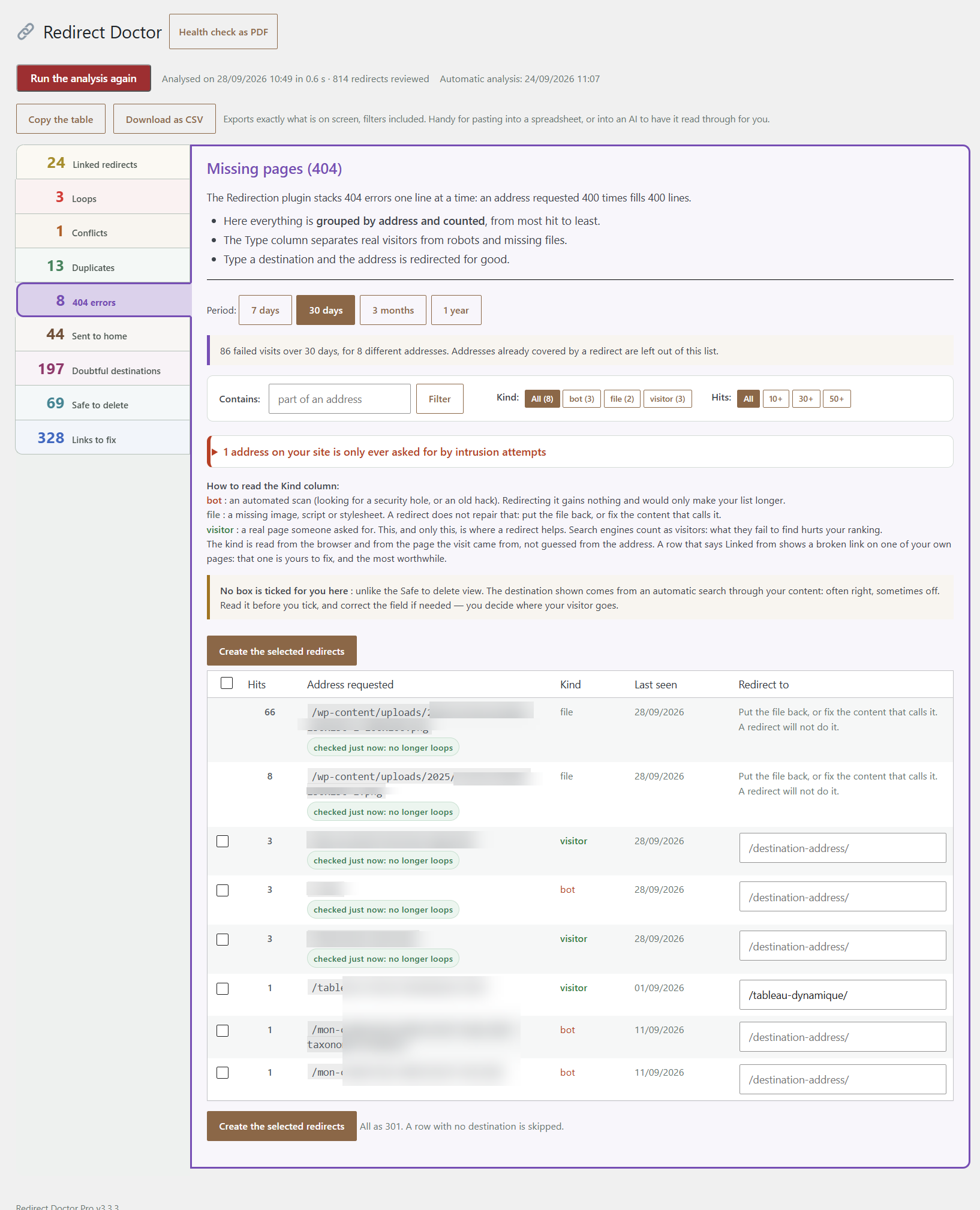
- 404 errors, grouped — not a raw log, but pages people actually keep asking for, sorted by
how often they are hit, with a suggested destination for each. - Redirects safe to delete — rules that have not sent a single visitor in years.
- Redirects sent to the home page — rules that do not send the visitor to a replacement
page, but to your home page. This is not a redirect, it is a soft 404: you are telling
Google that a dead address now holds your home page, and your home page slowly takes on the
reputation of every dead address pointed at it. - Doubtful destinations — redirects whose starting address and destination share no word
at all. Often a batch of rules pointed at something that has nothing to do with them. The
screen ranks them; you decide, and you can mark a pair as intended so it stops being
reported. - Links to fix in your content — posts and pages that still link to an address which now
redirects. Fixing the link removes the hop at the source.
Everything is measured against your own site. No external service is contacted, no data leaves
your server, and nothing is written unless you tick a box and click a button.
Requires the Redirection plugin
Redirect Doctor reads the tables of the Redirection plugin by John Godley. It is built on
top of it, the way an extension is built on top of WooCommerce. Without Redirection installed
and active, Redirect Doctor has nothing to read and WordPress will not let you activate it.
What the free version does
The free version is a complete diagnosis. All nine screens, the real totals, the filters,
the search, the CSV export, the copy-to-clipboard button — and the printable health check.
That health check sums up everything found on your site in numbers, with the risk each one
represents, and names no address. You can hand it to a client or a manager as it is.
Each table shows its first five rows, and tells you how many more there are. The counters on
the tiles are never rounded, never capped and never faked: if your site has 1,609 unresolved
404s, it says 1,609.
Two things belong to the Pro version:
- Fixing. Every action button is visible but switched off. Nothing is deleted, created or
rewritten by the free version — ever. - The addresses that form your loops. The free version tells you how many loops you have
and how many redirects they involve. Finding a loop buried in fifteen years of accumulated
rules is the hard part; undoing it takes three clicks.
What the Pro version adds
- Every row of every table, not the first five.
- The loop map: which addresses point at each other.
- One-click fixing, with an undo. Shorten a chain so each step goes straight to the final
destination. Delete dead rules. Create redirects for your most-hit 404s. Break a loop by
removing a link. - Rewriting the links inside your content that still point at an old address, as relative
addresses so they survive a domain change. - An action log of everything that was changed, with its own export.
- A health check that also shows where you started and where you are now.
Nothing is ever changed without a ticked box, and every batch stays recoverable afterwards.
Pro is available from orion-sigma.com.
Screenshots




Installation
- Install and activate Redirection first — Redirect Doctor reads its data.
- Upload the
redirect-doctorfolder to/wp-content/plugins/, or install the ZIP from Plugins Add New Upload Plugin. - Activate the plugin.
- Open Tools Redirect Doctor. The first analysis runs on its own.
The analysis re-runs by itself once a week, and immediately after any change you make.
FAQ
-
Does it change anything on my site by itself?
-
No. The free version writes nothing at all — the code that writes is not even included in the
free download. In the Pro version, nothing happens without a ticked box and a click, and every
batch you delete stays recoverable. -
Will it slow my site down?
-
No. Everything happens in the WordPress admin, on demand. Nothing is added to the pages your
visitors see. -
Does it work with Yoast, Rank Math or my host’s redirect manager?
-
No. Redirect Doctor is built specifically on the Redirection plugin and reads its tables.
That is a deliberate design choice, not an oversight. -
What is a redirect chain, and why should I care?
-
/old-page/ sends to
/newer-page/, which sends to/current-page/. The visitor’s browser
makes three requests instead of one, and search engines dilute the signal at every hop. Pointing
each rule straight at the final destination fixes it without breaking any of the old addresses. -
Why does the free version hide which addresses form my loops?
-
Because on that one screen, knowing is the work. Once you know that
/a/and/b/point at
each other, removing one of them takes three clicks. Spotting that pair inside years of
accumulated rules is what the plugin is for. Every other screen shows you real rows from your
own site. -
Is my data sent anywhere?
-
No. Redirect Doctor contacts no external service. Everything it reads and writes stays in your
own database. -
In which languages is it available?
-
English and French. Translations live in
/languages/and can be edited with any translation
plugin.
Reviews
There are no reviews for this plugin.
Contributors & Developers
“Redirect Doctor” is open source software. The following people have contributed to this plugin.
Contributors
Translate “Redirect Doctor” into your language.
Interested in development?
Browse the code, check out the SVN repository, or subscribe to the development log by RSS.
Changelog
3.3.3
- New colour for the main action button.
3.3.2
- The target address now keeps its trailing slash on screen and, above all, in the links
that “Links to fix” rewrites. Writing /page instead of /page/ made WordPress answer with
a canonical redirect, so the tool replaced one pointless round trip with another. - The rewritten link is taken from the canonical permalink of the destination when the
destination is a published post or page.
3.3.1
- Inline CSS and JS now go through the official WordPress functions: wp_register_style with
wp_add_inline_style for the admin screens, wp_print_inline_style_tag and
wp_print_inline_script_tag for the standalone report. - The print button no longer carries an inline onclick handler.
3.3.0
- Renamed to Redirect Doctor. The former name was the registered trademark of an unrelated company.
- New menu icon: a stethoscope drawn in the plugin, as no Dashicon suggests health.
3.2.4
- Reads a third form of destination used by Redirection for “URL and server” rules,
where the target sits inside a serialised array. The report showed that raw array instead
of the address. - Shortening a chain now writes inside that form instead of replacing it, so the rule keeps
its server and its fallback address. Replacing it would have broken the rule.
3.2.3
- First release on WordPress.org.
- Nine screens, laid out vertically: chained redirects, loops, conflicts, duplicates, grouped
404s, redirects sent to the home page, doubtful destinations, redirects safe to delete, and
links to fix inside your own content. - Doubtful destinations: compares the words of a starting address with those of its
destination, and lets you mark a pair as intended so it stops being reported. - Detects a site redirecting to itself in an endless loop, and recognises the WooCommerce
geolocation fingerprint behind it. - A one-click health check, ready to print or save as PDF. It names no address, so it can be
handed to a client as it is.
2.32.0
- New, and free: spots addresses that are not missing pages at all, but a site redirecting to
itself in an endless loop. Names the culprit when your server reports it. - Recognises the WooCommerce geolocation fingerprint, and says exactly which setting to change.
2.31.0
- Pro: rewrite the links inside your content that still point at an old address. Tick the lines,
click once, and undo it if you change your mind. - Links are written as relative addresses, so they survive a domain change.
2.30.0
- Pro: a Licence screen. Enter your key, the site is registered, the fixing features open.
- If our licence server is ever unreachable, nothing changes on your site.
2.28.0
- New: a one-click health check, ready to print or save as PDF. It sums up the whole analysis
in numbers and names no address, so it can be handed to a client as it is. - Pro: the report also shows where you started and where you are now.
2.27.0
- Declares Redirection as a required plugin, so WordPress refuses activation without it instead of showing an empty screen.
- Added this readme.
2.26.0
- The “more rows” notice is now the last row of the table, introduced by three dots, instead of
a paragraph underneath. A table that stops dead looks complete. - The CSV export skips that row.
2.25.0
- The free version shows the first five rows of each table, and says how many remain. Five per
table, not per screen. Tile counters remain complete and truthful.
2.24.0
- The loops screen now reports how many loops exist and how many redirects they involve, without
listing the addresses, in the free version.
2.23.0
- Free and Pro became two separate downloads. The code that writes to the database now lives in
its own file, which the free package does not contain.
2.22.0
- Conflicts split away from duplicates: the same address with two different destinations is a
far more serious fault than a rule written twice. - Nine screens, each with its own colour, and an explanation written in plain language.
2.16.0
- Action history, with its own export.
- Deleting a batch became recoverable.