

Description
Verified, not just detected. Finding a C2PA manifest in a file is
easy; knowing whether it is genuine is not. A manifest can be copied onto
another image, and an image can be changed after it was signed while its
manifest still claims what it did before. Tracefern checks the signature,
the hash that ties the manifest to the image’s own bytes, and the signer’s
certificate against the C2PA trust lists. Only when the signature and the
hash hold does it show “AI-generated (signed)”, and only when the signer
is also on the trust list does it say “Verified”.
Content Credentials (C2PA) are a signed record inside an image file: who
made or edited it, with which tool, and whether generative AI was used.
Tracefern Image Check for C2PA verifies that record for every JPEG, PNG and WebP you
upload and shows the verdict where you already work with media.
- Checked right after upload, on the original file, not on the
resized copies WordPress or your browser makes. The check runs in the
background, so a file that trips it up can never break an upload. - A verdict per image in a Media Library column and in the attachment
details: who signed it, when, and against which trust list. - “AI-generated (signed)” when a manifest that verifies says the image
was made by generative AI, also after later edits, and “AI-edited
(signed)” when AI edited it. Never on a file that does not verify. - Sort and filter the Media Library list by verdict, including all
AI-generated images. - Check existing images again with WP-CLI:
wp tracefern check –all.
The verdicts:
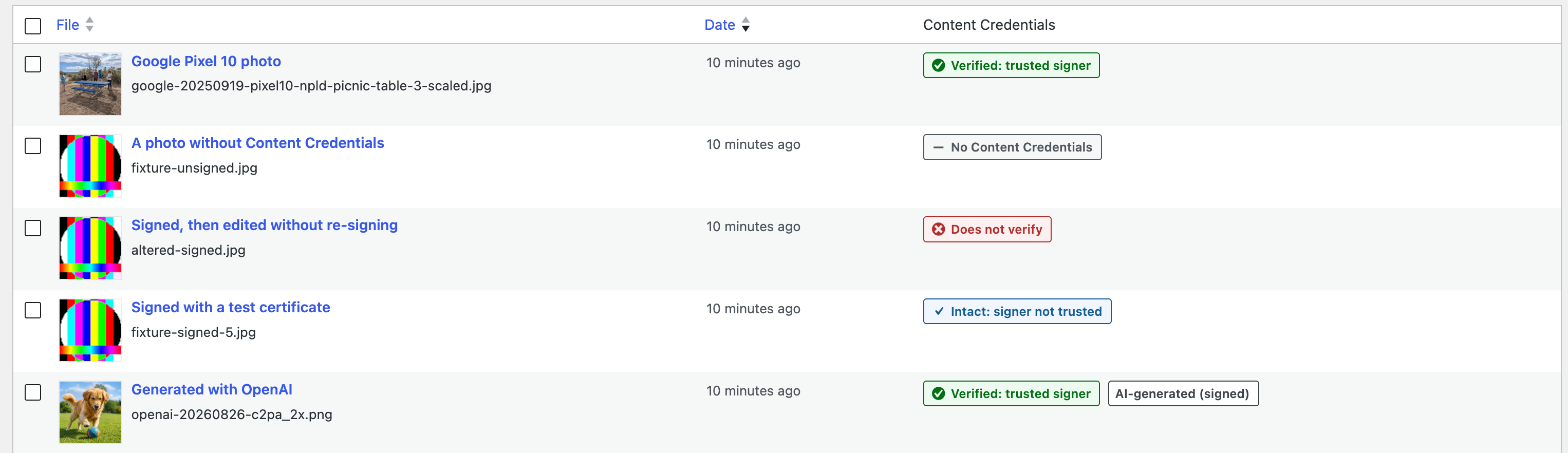
- Verified: trusted signer — the credentials verify and the signer’s
certificate chains to a trusted certificate authority. - Intact: signer not trusted — the credentials verify, but the signer
is not on the trust list. The file is unchanged since signing; who
signed it is not vouched for. - Does not verify — something failed, for example the image was
changed after signing. The details list the C2PA status codes. - No Content Credentials — the file carries none. Most images today.
- Could not be checked — the file could not be read or the check did
not finish. The upload always proceeds.
What it does not do:
- It never signs anything and holds no keys.
- It never blocks an upload.
- It makes no network calls. A manifest that is only referenced by URL is
not fetched, and trust lists are never downloaded.
Verification is done by
provemark/c2pa-verifier, a
C2PA verifier written in PHP, bundled with the plugin.
Development
The source code, the tests and the build are public at
https://github.com/provemark/tracefern-image-check. composer build makes the
plugin’s zip from it: it installs the bundled verifier and prefixes its
namespace with Strauss, so it cannot collide with another copy. The
verifier itself is developed at https://github.com/provemark/c2pa-verifier.
Trust lists
By default the plugin trusts the certificate authorities on the C2PA
conformance programme’s trust lists, bundled with the plugin (see
trust/README.md for the date and source), and, optionally, the DigiCert
Trusted Root G4 for timestamps. Settings Tracefern shows the date of the
bundled copy and lets an administrator replace the lists with their own
trust settings. The plugin never downloads a list; a new copy comes with a
plugin update.
The C2PA trust lists are © the Coalition for Content Provenance and
Authenticity (C2PA), from https://github.com/c2pa-org/conformance-public,
licensed under CC BY 4.0 (https://creativecommons.org/licenses/by/4.0/).
Screenshots


Installation
- Install and activate the plugin. The server needs PHP 8.3 or later with
the
opensslandmbstringextensions. - Upload images as usual. Each JPEG, PNG and WebP is checked in the background, usually within seconds; until then it shows “Check pending”.
- Optional: under Settings Tracefern, choose whether to trust DigiCert timestamps, or paste your own trust settings.
- Images uploaded before the plugin was active show “Not checked”. Check
them with
wp tracefern check --unchecked(WP-CLI).
FAQ
-
How is this different from plugins that label AI images?
-
Many plugins look for C2PA or IPTC metadata and label an image as
AI-generated when they find it. Some count any C2PA manifest as AI, so a
camera photo with Content Credentials is labelled AI-generated. Others
read what the manifest claims without checking it, so an AI image that was
changed after signing keeps its label. Tracefern verifies first: a camera
photo stays a camera photo, and a changed image says “Does not verify” and
loses the label. It adds no badges to your pages; it gives you the verdict
a label can rely on. -
What is the difference between “Verified” and “Intact”?
-
Both mean the file is exactly as it was signed. “Verified” also means the
signer’s certificate comes from an authority on the trust list, by default
the C2PA conformance programme’s list. “Intact” means nobody on that list
vouches for who the signer is. -
Why does a genuine photo say “Does not verify”?
-
The file was changed after it was signed, for example by an editor that
kept the old Content Credentials but not the signature’s match with the
pixels. The details show the status codes;assertion.dataHash.mismatch
means the image data changed. -
Why do most of my images show “No Content Credentials”?
-
Most cameras and apps do not add them yet, and many services remove them
when an image is shared or downloaded. -
Does “AI-generated (signed)” detect AI images?
-
No. It shows what a verified manifest says about the image or the
earlier versions it was made from, each of which must verify too. An
AI image without Content Credentials gets no label. Next to “Intact: signer
not trusted” the claim comes from a signer nobody on the trust list vouches
for. -
Does it change my images or send data anywhere?
-
No. It only reads the original file and stores the result with the image.
Settings Privacy offers suggested text for your privacy policy. -
Why does an image say “Check pending”?
-
The check runs in the background through WP-Cron, on the next request to
the site after the upload, usually within seconds. If WP-Cron is switched
off (DISABLE_WP_CRON), the checks run with the site’s own cron job.
After an hour without a result the image shows “Not checked”; check it
withwp tracefern check --unchecked. -
Why does an image say “Changed since its check”?
-
Its file was replaced after the check by something WordPress did not
report, such as another plugin or an upload over FTP. The old verdict no
longer applies, so none is shown; check it again with
wp tracefern check . An image edited in WordPress’s own image
editor, or restored to its original, is checked again automatically. After
moving a site with a tool that does not keep file modification times, or
with media moved to external storage, every image can show this; check
them again withwp tracefern check --all. -
Which formats are checked?
-
JPEG, PNG and WebP. HEIC files are converted to JPEG by the browser before
upload and arrive without their Content Credentials. Video and audio are
not checked. -
How do I check images again after changing the trust settings?
-
With WP-CLI:
wp tracefern check --all, or--state=Invalid,error,
or attachment IDs. Add--dry-runto see what would be checked. -
Does it work on multisite?
-
Yes. Each site checks its own uploads and has its own settings. Deleting
the plugin removes its data from every site of the network, in one
request; on a network of thousands of sites, prefer WP-CLI. -
Can other plugins use the verdict?
-
Yes, through a filter, with no dependency on this plugin:
apply_filters( ‘tracefern_verdict’, null, $attachment_id ). It returns
null when the plugin is not active or the ID is not an attachment, and
otherwise an array:status(checked,pending,not_checked,
changed,unreadable),state,intact,trusted,ai(true
exactly when the Media Library shows “AI-generated (signed)”),ai_edited
(the same for “AI-edited (signed)”),signer,
signed_at,codesand more.signercomes from the file: escape it
where you output it. -
Why PHP 8.3?
-
The bundled verifier requires PHP 8.3 or later.
Reviews
There are no reviews for this plugin.
Contributors & Developers
“Tracefern Image Check for C2PA” is open source software. The following people have contributed to this plugin.
Contributors
Translate “Tracefern Image Check for C2PA” into your language.
Interested in development?
Browse the code, check out the SVN repository, or subscribe to the development log by RSS.
Changelog
0.1.3
- The AI label follows an image’s history: an AI image that was later watermarked or converted is still “AI-generated (signed)”.
- New label “AI-edited (signed)”, and
ai_editedin thetracefern_verdictfilter.
0.1.2
- Bundles c2pa-verifier 0.2.6, a security release: an image signed with an RSA key whose public exponent is 1 no longer shows as trusted, since such a signature needs no private key.
0.1.1
- Other plugins can read the verdict through the
tracefern_verdictfilter.
0.1.0
- Verifies the Content Credentials of JPEG, PNG and WebP uploads on the original file, in the background.
- Media Library column and attachment details, with an AI label for verified AI images.
- Bundled C2PA trust lists (2026-08-14), DigiCert timestamps, custom trust settings.
- Sorting and filtering by verdict;
wp tracefern checkfor existing images. - Suggested privacy policy text; data removed on uninstall.